
دليل: كيف تستخدم WhatsApp على iOS
آخر تحديث: October 12, 2016
(تحذير) حالياً لا ننصح باستخدام تطبيق واتساب للاتصالات الآمنة. اقرأ التفسير الكامل لذلك هنا.
ما يثير مخاوفنا على وجه الخصوص هو التصريح الذي قام به تطبيق واتسآب في أغسطس/ أب 2016 عن سياسة الخصوصية الجديدة التي تسمح بتشارك المعلومات مع شركته الأم فيسبوك. يسمح ذلك لفيسبوك بالوصول إلى العديد من المعلومات الخاصة بمستخدمي واتسآب بما في ذلك أرقام الهواتف وبيانات الاستخدام.
وقد سُمِح لمستخدمي واتسآب عند الإعلان عن سياسة الخصوصية الجديدة بفترة انتقالية يتمكنون أثناءها من تغيير إعداداتهم لمنع فيسبوك من اقتراح أصدقاء أو عرض إعلانات بناءً على البينات التي يتم الحصول عليها من واتسآب. إلا أن أصحاب الحسابات الجديدة لا يملكون هذا الخيار الذي يسمح برفض هذا الاستخدام الموسع لبياناتهم. عوضاً عن ذلك فإن الخيار الوحيد المتوفر للمستخدمين الجدد هو القرار باستخدام واتسآب بسياسة خصوصيته الجديدة ومشاركة المعلومات المترتبة عليها من عدمه. ومع أن الشركة تأكد للمستخدمين بأنها لن تشارك بياناتهم بشكل مباشر مع المعلنين إلا أن سياسة الخصوصية الجديدة ما زالت تشكل تهديداً واضحاً لسيطرة المستخدمين على الطريقة التي يتم فيها استخدام ومشاركة بياناتهم.
بالإضافة لذلك فإننا قلقون من تطبيق واتسآب على الإنترنت. إذ يقدم واتسآب للمستخدمين واجهة آمنة للتصفح عبر بروتوكول نقل النصوص المتشعبة الآمن HTTPS لإرسال واستقبال الرسائل، إلا أنه، شأن كافة المواقع الالكترونية، فإن الموارد اللازمة لتحميل التطبيق يتم تقديمها في كل مرة تقوم فيها بزيارة ذلك الموقع، وبالتالي حتى وإن كان المتصفح يدعم نظام التشفير crypto فإن التطبيق المتسخدم على الإنترنت قابل للتعديل بسهولة ليقدم نسخة خبيثة من التطبيق عند أي تحميل للصفحة، تكون قادرة على تقديم كل رسائلك إلى طرف ثالث.
ما زال واتسآب يقدم تشفيراً من الطرف إلى الطرف والذي يضمن بأن يتم تحويل الرسالة إلى رسالة سرية من قبل مرسلها الأصلي وفك تشفيرها من قبل مستقبِلِها النهائي حصراً. إننا لا نجادل الطريقة التي يتم فيها هذا التشفير، ففي الحقيقة فإننا نأمل أن يصبح بروتوكول التشفير الذي يستخدمه واتسآب، وهو بروتوكول سجنال، واسع الانتشار في المستقبل، وإنما نحن قلقون من الأمن والخصوصية لدى واتسآب رغم جودة بوتوكول سجنال.
(تحذير): إذا كنت ما زلت ترغب باستخدام واتسآب راجع دليلنا التعليمي أدناه وتأكد من إطفاء النسخ الاحتياطي على السحابة وتشغيل إشعارات تغيير البصمة (انظر فقرة "إعدادات الأمن الإضافية")
موقع التنزيل: يمكن تنزيل التطبيق من متجر التطبيقات App Store
متطلبات النظام:iOS 6 أو أحدث. أجهزة iPod وiPad غير مدعومة حالياً.
الإصدار المستخدم في هذا الدليل: 2.16.2
الرخصة: خاصة
قراءات أخرى:
- https://blog.whatsapp.com/10000618/end-to-end-encryption
- https://www.whatsapp.com/security/WhatsApp-Security-Whitepaper.pdf
- https://medium.com/@thegrugq/operational-whatsapp-on-ios-ce9a4231a034
المستوى: مبتدئ – متوسط
الوقت المطلوب: 15-20 دقيقة
واتسآب تطبيق يسمح لمستخدمي الأجهزة المحمولة التواصل باستخدام التشفير من الطرف إلى الطرف، حيث يمكن للمستخدمين عبره الدردشة والاتصال هاتفياً وإرسال الملفات وإجراء المحادثات الجماعية بشكل آمن. وعلى الرغم من أنه يستخدم أرقام الهاتف لجهات الاتصال فإن المكالمات والرسائل تستخدم اتصال البيانات الخاص بك؛ وبالتالي يتوجب توفر اتصال بالإنترنت لطرفي المحادثة على أجهزتهم المحمولة. ولهذا السبب لا يترتب على المستخدمين رسوم رسائل نصية قصيرة SMS أو MMS.

واتسآب مملوك من قبل فيسبوك، والتطبيق بحد ذاته مغلق المصدر، مما يعني أنه يصعب على الخبراء الخارجيين التحقق من تطبيق الشركة للتشفير بشكل آمن. وعلى الرغم من ذلك، فإن الأساليب التي يستخدمها واتسآب لإرسال الرسائل هي أساليب معروفة وتعتبر آمنة.
إعداد واتسآب على الآيفون
الخطوة 1: تنزيل وتثبيت واتسآب
قم بفتح متجر التطبيقات App Store على الآيفون الخاص بك والبحث عن "WhatsApp". اضغط على Get (حصول) ثم Install (تثبيت) بجانب التطبيق WhatsApp Messanger by WhatsApp Inc
عند اكتمال التنزيل، قم بالضغط على Open (فتح) لإطلاق التطبيق.
الخطوة 2: التسجيل وتأكيد رقم الهاتف
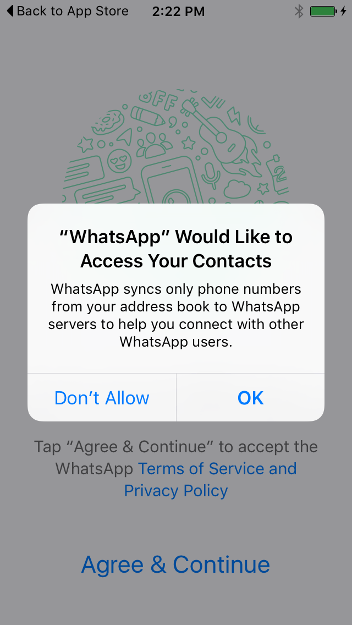
سيطلب واتسآب الوصول إلى جهات الاتصال لديك. إن سمحت لواتسآب بذلك سيحصل التطبيق على قائمة كاملة بأرقام هواتف جهات الاتصال لديك. إن لم تمنحه حق الوصول ذاك، يمكنك يدوياً إضافة كل من جهات الاتصال لديك للمحادثة النصية عبر التطبيق، إلا أنه لا يمكنك إجراء اتصال هاتفي بواسطة التطبيق دون منحه حق الوصول إلى جهات الاتصال على هاتفك. إن أردت إرسال صور أو فيديوهات أو ملفات عبر التطبيق سيطلب واتسآب الوصول إلى تلك الملفات أيضاً.
اضغط على "متابعة" ثم "سماح" للكل إذا أردت منح تلك الصلاحيات.
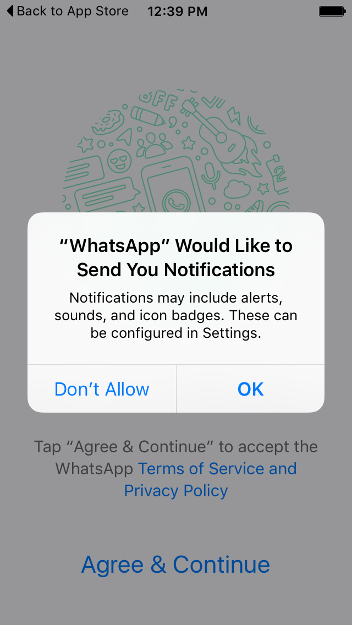
بعد ذلك سيطلب التطبيق الإذن لإرسال الإشعارات لك. قم بالضغط على "موافق" ليتم إشعارك عند وصول رسائل جديدة.
يتوجب عليك أولاً قبول أحكام وشروط واتسآب وسياسة الخصوصية.
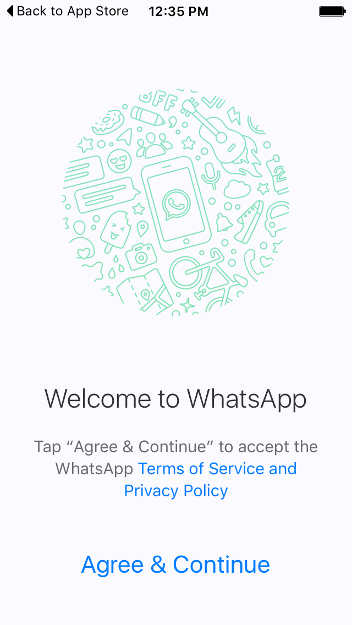
اضغط على "موافقة ومتابعة". ستظهر شاشة كالتالي:
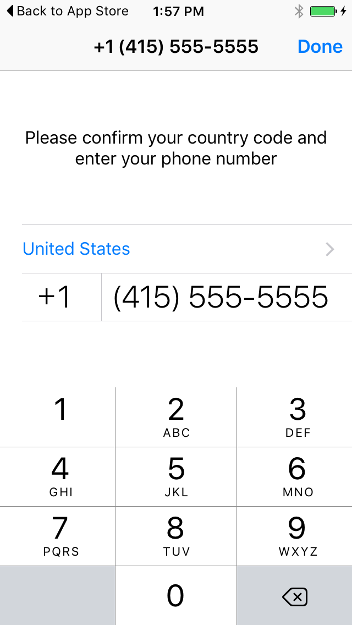
أدخل رقم هاتفك واضغط على "تم". ستظهر نافذة التأكيد التالية:
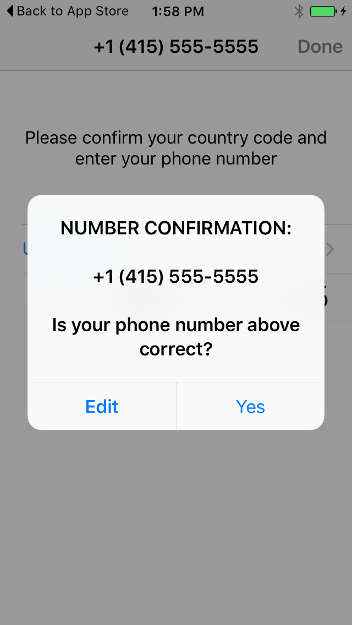
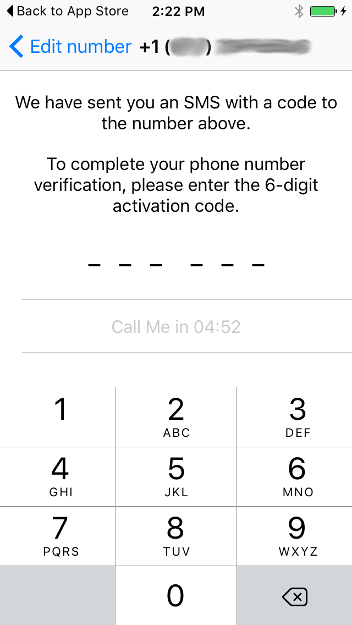
اضغط على "نعم". لتأكيد رقمك، سيجري إرسال رسالة نصية قصيرة SMS تحوي رمزاً يتكون من ستة أرقام. قم بإدخاله في الخطوة التالية:
استخدام واتسآب
لاستخدام واتسآب، يتوجب على الشخص الذي تراسله أو تهاتفه تثبيت واتسآب أيضاً.
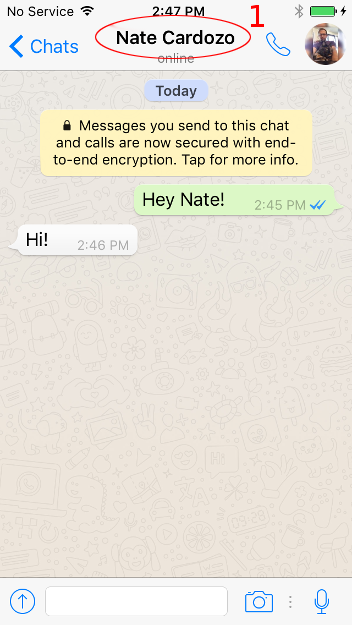
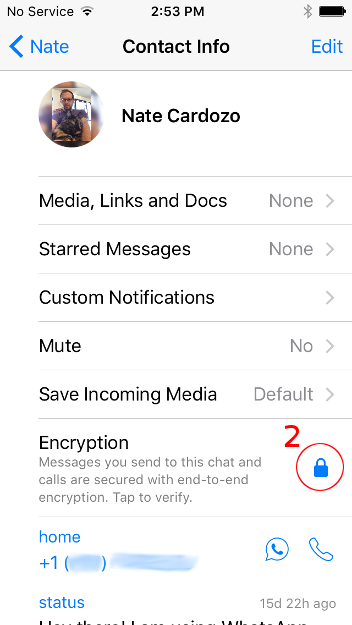
عند بدء محادثة مشفرة جديدة، سيظهر إشعار يفيد بما يلي: "الرسائل المرسلة في هذه المحادثة والمكالمات مشفرة باستخدام التشفير من الطرف إلى الطرف. يرجى الضغط لمزيد من المعلومات". يمكنك الآن التحقق من هوية الشخص الذي تحادثه، لضمان أن مفتاح التشفير الخاص به لم يتم العبث به أو استبداله بمفتاح شخص آخر عند تنزيل التطبيق للمفتاح (عملية تدعى التحقق من المفاتيح). تجري عملية التحقق بحضور الشخص الآخر وجهاً لوجه. للتحقق يمكنك عرض جهة الاتصال بالضغط على الاسم في الأعلى [1]، ثم الضغط على القفل الأزرق[2] في الشاشة التالية:
اطلب من الشخص الآخر اتباع نفس العملية على هاتفه. ستظهر الشاشة التالية بعنوان "التحقق من رمز الأمان":
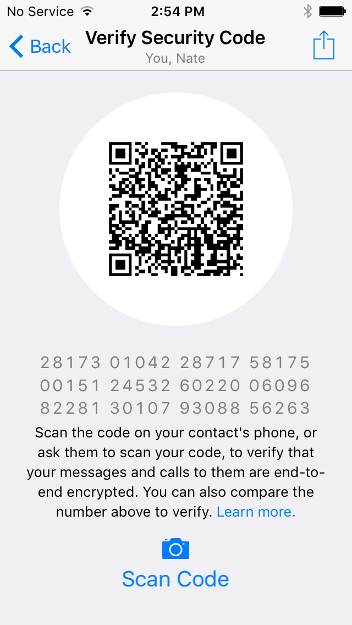
سيظهر رمز مكون من 60 رقماً. يمكنك التحقق إما عبر قراءة الأرقام بنفسك والتأكد من تطابقها مع أرقام الشخص الآخر، أو عبر قيام الشخص الآخر بمسح رمز QR الظاهر على الشاشة.
هناك أسلوب آخر يمكنك استخدامه وهو التقاط صورة للشاشة تحوي الأرقام ومشاركتها عبر طريقة آمنة أخرى.
عند اكتمال هذه العملية تضمن أن الاتصالات المشفرة مع جهة الاتصال تلك لا يمكن الوصول إليها من قبل جهات أخرى. وذلك ينطبق على الرسائل النصية ضمن واتسآب بالإضافة إلى المكالمات الصوتية ضمن التطبيق.
إعدادات أمان إضافية
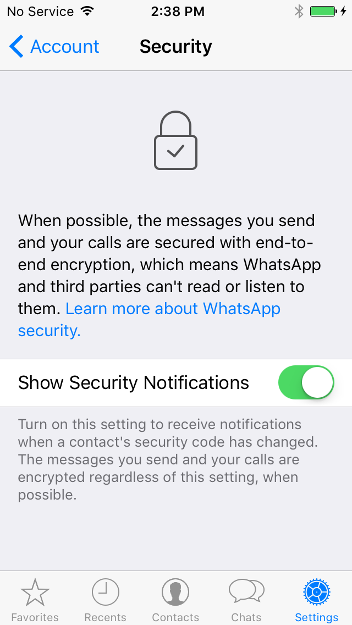
عرض إشعارات الأمان
كما ذكرنا أعلاه، يفضل أن تبقى على إطلاع إذا ما تغير مفتاح التشفير الخاص بإحدى جهات الاتصال الخاصة بك.
النسخ الاحتياطي إلى iCloud
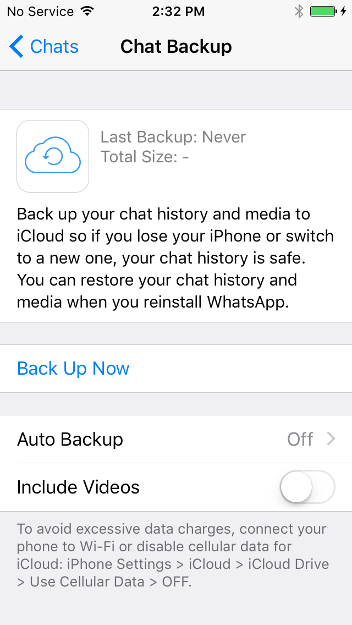
كما ذكرنا أعلاه، يتوجب عليك ضمان عدم إرسال نسخ احتياطية غير مشفرة إلى Apple.
انتقل إلى الإعدادات > المحادثات > النسخ الاحتياطي للمحادثات لضمان إيقاف تشغيل النسخ الاحتياطي إلى السحابة. قم باختيار "إيقاف" عند "النسخ الاحتياطي التلقائي":